Jenkins
Jenkins
Jenkins (https://jenkins2.topicusonderwijs.nl/) is the shared build server for all Topicus projects. Parro Nexus uses Jenkins to build all apps, libraries, helm charts and this documentation server.
A jenkins build is a series of builds steps which are described in a Jenkinsfile. The Jenkinsfile is written in groovy. In the Topicus Jenkins setup each step is executed in a docker container.
Common build steps are:
- Build the code (
yarn install) - Test the code (
yarn test) - Build docker containers
- Publish docker containers
- Build helm charts
- Deploy helm charts
- Validate/lint code
Jenkins lib
For Parro Nexus we created some common helper methods which include some large groovy methods. To keep this code out of the Jenkinsfile, so it remains readable, we created a library project.
The library project is maintained in a branch in the infra repo: https://github.com/topicusonderwijs/parro-connect-infra/tree/jenkins-connect-lib
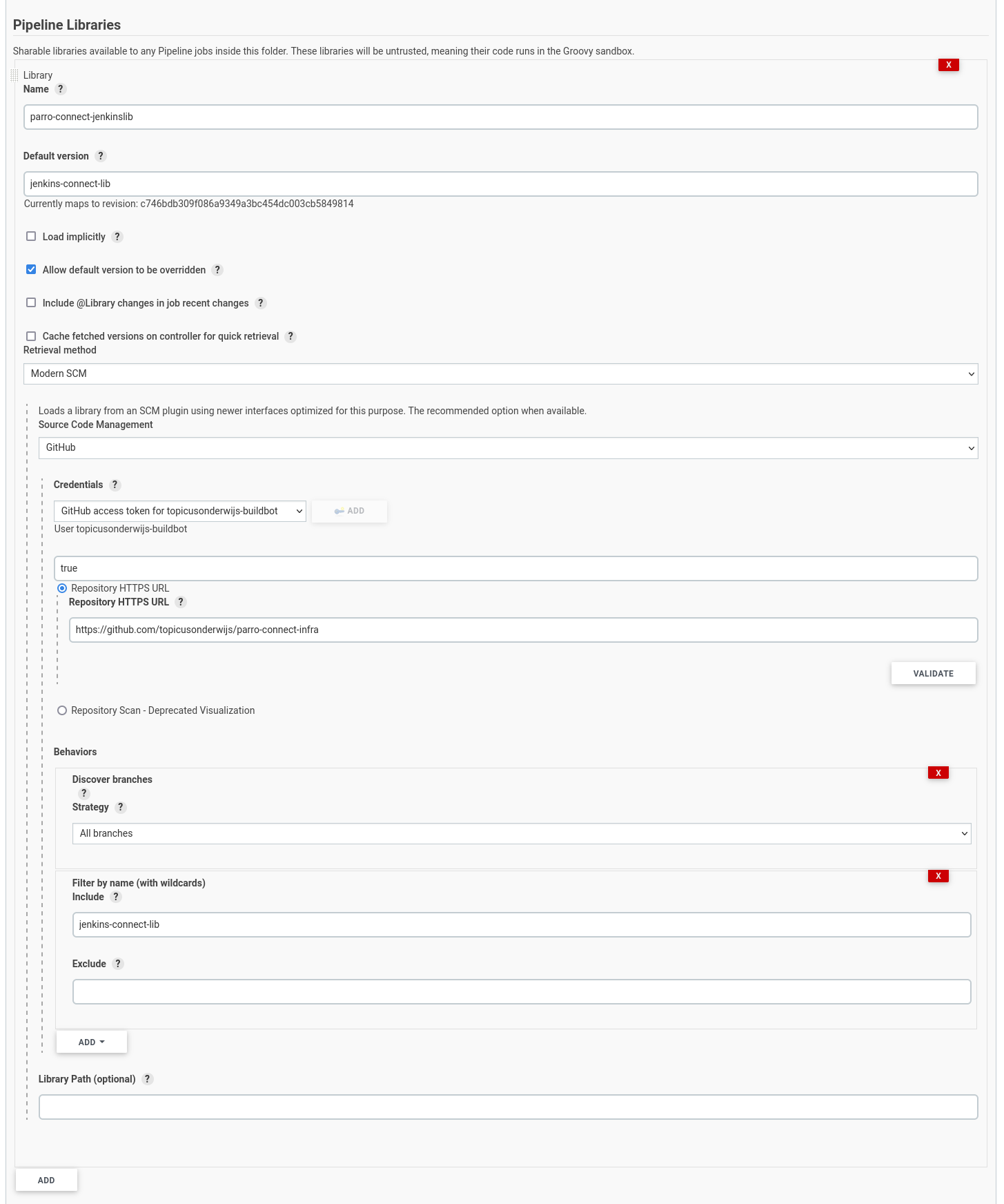
To use the library project you need to configure this in Jenkins as a Pipeline Libraries.
This is done in the Jenkins project configuration: https://jenkins2.topicusonderwijs.nl/view/Parro/job/Microservices/configure
Building an app
Apps are built when changes are detected. This is done by a special “starer” job (https://jenkins2.topicusonderwijs.nl/view/Parro/job/Microservices/job/ParroServiceBuilderStarter/). This job will detect changes for any branch of the Parro Nexus repo. When a change is detected it will use the methods from our jenkins lib to scan the changed files and detect which apps and libs are changed.
When it detects a app is changed it will go to the app directory (i.e. /apps/customer-api-gateway) and look for a .jenkins.yaml file.
This .jenkins.yaml file contains information on how to build the app. For example the .jenkins.yaml for the customer-api-gateway contains job: app_customer_api_gateway.
So now the starte job will trigger a second Jenkins job called app_customer_api_gateway and passes that job the commit hash and the branch name on which a change was detected.
The app_customer_api_gateway job will then run and build the configured Jenkinsfile for that job, in case of the customer-api-gateway that would be apps/customer-api-gateway/Jenkinsfile.
For now all the apps have the same Jenkinsfile, containing the following steps:
Build and test
nodejs {
    stage = 'Build and test'
    version = "16"
    commands = """
        export DOCKER_HOST=${dockerHost}
        yarn install
        yarn lint
        yarn build
        yarn test:full-cov
    """
}
Validate build and publish a docker container
dockerfile.validate {
    stage = "Validate Docker file"
}
def serviceImage = dockerfile.build {
    stage = "Build image"
    name = "parro-connect/customer-api-gateway"
    registry = "docker-dev.topicusonderwijs.nl"
}
def tag = dockerExtra.createTagForBranch(branchName)
echo "Publishing image with tag: ${tag}"
dockerfile.publish {
    stage = "Publish image"
    image = serviceImage
    registry = "docker-dev.topicusonderwijs.nl"
    baseTag = false
    tags = [tag]
}
Tag the commit
stage("Tag"){
    if(branchName == "main"){
        git.tag("customer-api-gateway/${tag}")
    }else{
        jenkinsHelper.markStageAsSkipped("Tag")
    }
}
Deploy
The deploy step also triggers a separate job, which will checkout the development infra branch and change and commit the version of the app.
stage("Deploy"){
    if(branchName == "main"){
        build   job: "Microservices/deploy_development",
                wait: false,
                propagate: true,
                parameters: [
                                string(name: 'service_name', value: "customer-api-gateway"),
                                string(name: 'new_version', value: tag),
                            ]
    }else{
        jenkinsHelper.markStageAsSkipped("Deploy")
    }
}
Building libraries
For building libraries the same “starter” job is used as for building apps. The job will detect changed made to libraries and will look for a .jenkins.yaml file in the library directory.
It will then start the configured job.
The Jenkinsfile’s for libraries looks a bit different:
pipelineScript.run('Jenkinsfile-Lib', [
    git_branch: "${params.git_branch}",
    service_name: "${params.service_name}"
])
This is because all libraries share the exact same building logic. When multiple jobs share the same building logic it is easier to move this logic to its own branch.
This way you only need to change it once. The common approach for this is to create a branch called jenkins-pipline (https://github.com/topicusonderwijs/parro-nexus/tree/jenkins-pipeline) and add Jenkinsfile’s in this branch.
You can then call these Jenkinsfile’s using the syntax shown above.
The build steps for a library build:
Build
nodejs {
    stage = 'Build and test'
    version = "16"
    commands = """
        export DOCKER_HOST=${dockerHost}
        yarn install
        yarn lint
        yarn build
        yarn test:full-cov
    """
}
Publish
When changes are made to the main branch the job will publish a build to the artifactory. Since you cannot override a NPM module with the same version it will do a check if the version is changed.
If this is not the case the build will fail. When the build was successfully pushed it will send a Slack message with the new version number.
stage("Publish"){
    if(branchName == "main"){
        println("New version is ${newVersion}")
        if(!nodeLib.isPackageVersionGreaterThanOrEqualTo(newVersion)){
            slackSend channel: 'parro-connect-build', color: 'danger', message: "Could not deploy ${libName}, version in package.json should at least be ${newVersion}. Run script: yarn version:for-release"
            error()
        }
        if(!changelog.isPresent() || !changelog.isVersionPresent(libName, newVersion)){
            slackSend channel: 'parro-connect-build', color: 'danger', message: "Could not deploy ${libName}:${newVersion}, no CHANGELOG file or entry found describing this release. Use the syntax [${libName}/${newVersion}] for this build"
            error()
        }

        nodejs.publish {
            stage = ""
        }

        slackSend channel: 'parro-connect-build', color: 'good', message: "New version (${newVersion}) of ${libName} is published. Run `yarn add @parro-connect/${libName}@${newVersion}` to use this version"

    }else {
        jenkinsHelper.markStageAsSkipped("Publish")
    }
}
Tag
stage("Tag"){
    if(branchName == "main"){
        git.tag("${libName}/${newVersion}")
    }else{
        jenkinsHelper.markStageAsSkipped("Tag")
    }
}