Dependencies
Dependency updates
Since Parro Nexus is a nodejs project it uses lots of npm dependencies, which gets updated a lot.
To manage all these updates we use dependabot.
This bot is set up and maintained by the infra team, however the configuration can for this repo can be found in the .github/renovate.json5 file.
Each time dependabot runs a scan on the project and when it finds out of date dependencies it will create a PR.
To make sure Parro Nexus is kept up to date it is important to merge these PR’s on a regular basis (i.e. once a week).
There are 2 ways to merge the dependabot updates.
Merging using github
The dependabot is confined to make a PR for the task-dep-updates branch instead of main.
This is done so you can collect multiple PR’s and merge them all at once to main.
Since dependabot makes PR’s you can view these in github and you can also merge them from github. This is the easiest way to update the dependencies, however there is a catch.
Since most dependency updates also change the yarn.lock file it is really easy to get merge conflicts.
So when you merge PR1 there is a good chance that PR2 is not merge-able anymore.
Dependabot has a solution for this:
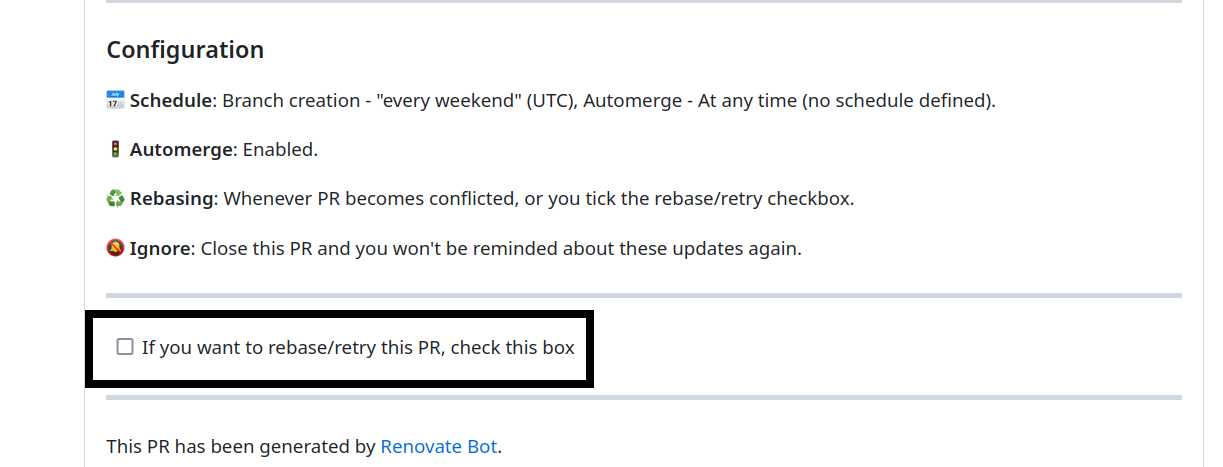
When you encounter a PR with merge conflicts you can tick the rebase checkbox. This will trigger a reschedule by dependabot so it will rebase the PR.
NOTE: This can take up to 10 minutes
When you merge a PR the changes are merged into the task-dep-updates branch.
There is a Jenkins job which will trigger on all commits on this branch.
When this job is done and green you can merge task-dep-updates into the main branch.
This is manual step and should be done from your own laptop.
IMPORTANT: DON’T remove the
task-dep-updatesbranch when you merge it into main!
Merging manually (ambachtelijk :) )
Sometimes you want to execute a dependency update manually, or you don’t want to wait on dependabot.
This can be done using a script scripts/update_single_dependency_all.sh
This script will ask for 2 inputs:
- dependency name
- dependency version
These can be found in the PR information:
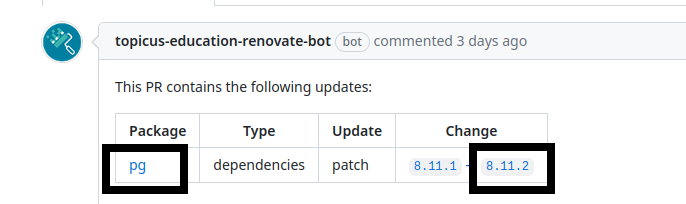
The script will loop over all apps and execute a yarn add <name>@^<version>
After running the script you can run the tests and check if everything is still working as expected. The script does not commit anything, so you will need to do this yourself